Find the resource
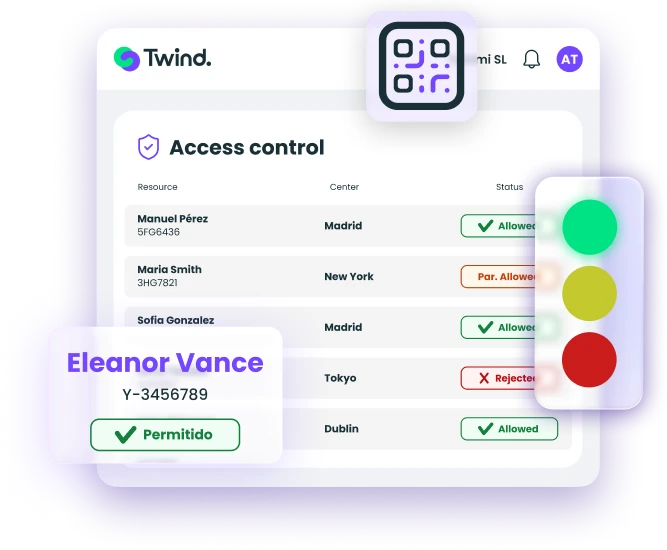
A worker arrives at your site. The supervisor looks them up in Twind via QR code or by work site, company, name or ID number, from web or app.

See any worker's or resource's access status instantly, from any device, along with what is blocking or allowing entry. If something expires today, they don't get in tomorrow — with no action needed from your team.







In real time, from web or mobile, with every entry logged.
A worker arrives at your site. The supervisor looks them up in Twind via QR code or by work site, company, name or ID number, from web or app.
Based on compliance status and your work site hierarchy, see access status at a glance: allowed or denied, and why.
Every contractor and visitor entry and exit is logged and can be exported to Excel. Always in sync with document status: if the documentation changes, the access status updates.
See at a glance whether access is allowed, partial or denied, by colour and in detail. Nothing to decipher.
When access isn't allowed, you see the critical requirements preventing it, whether pending or rejected.
Every contractor and visitor entry and exit is logged and exportable to Excel, audit-ready.
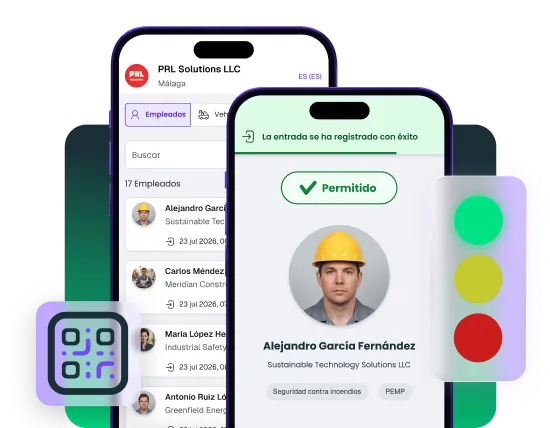
Check access from the web or your mobile. Take control with you in the field, with the Twind app.
Block entry if any critical requirement is missing, or show the breakdown by contract and activity. The reason is displayed, so everyone is informed.
Grant or block access on an exceptional basis, with automatic expiry and full traceability.
Register visitors in seconds, reuse their details for future visits and see live who is on site.
See who is present for emergencies or drills, with a full history exportable to Excel.
Identity, activity, company and status in a unique QR code per resource. A version customisable with your logo is available.
Connect Twind to your turnstiles, barriers and plant systems. If a contractor isn't allowed access, the turnstile will block them.
Available in the Twind App
Manage access, visits and temporary authorisations from your mobile, with the same checks as the web, even in remote areas with no signal, with no permanent gatehouse or at secondary entrances.
We are part of CTAIMA. For over 20 years we have worked side by side with hiring companies and contractors.
Clients
Contractors and suppliers
Workers managed per year
Countries
Industrial centers
Fill in the form and a contractor safety management specialist will contact you within 24 hours with a personalised walkthrough of the platform.
Frequently Asked Questions
Access control is included when you subscribe to the Twind platform. Some advanced features, such as field use via the mobile app, are purchased separately. Our sales team will explain what each option includes based on how you operate.
Yes. The Twind app has an offline mode that lets you keep verifying access without a connection and syncs the records once signal is restored. Configuration details depend on your type of facility.
Your system verifies identity. Twind's access control module verifies compliance. You can have the right card and still be blocked because your health and safety training expired yesterday. It's the difference between "this person exists in the system" and "this person is cleared to work on your site today under safety regulations".
Twind offers an API to integrate with physical access control systems and ERPs. Available integrations and timelines depend on your technical environment.
It depends on the number of work sites and contractors, and on the documentation you already have uploaded. Our implementation team will give you a plan with specific timelines once they understand your case.
The module works from day one: it shows compliance status based on whatever has been uploaded and flags what's missing. As the documentation is completed, access status updates automatically.
Yes: with temporary authorisations you can deny access on an exceptional basis, with a logged reason and an expiry window. Our sales team can show you how it works in the demo.

International Contractor Safety Management Software
Powered by

For Hiring Companies
For Contractors and Suppliers
Resources
©Twind. All Rights Reserved