Set up the inspection forms
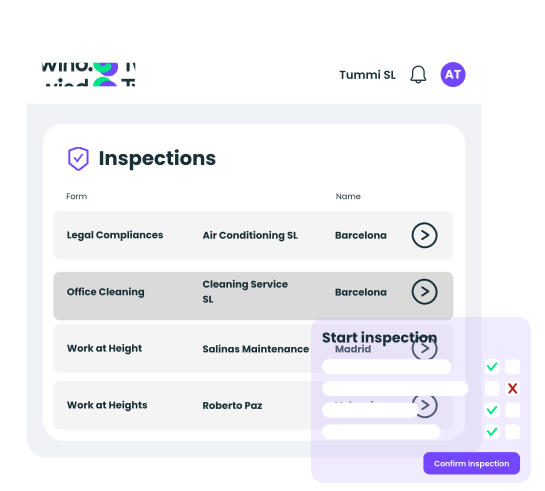
Create forms by contractor type, activity or work site. Define the fields, questions and assessment criteria you need. Assign which users can run each type of inspection.

Inspect your contractors or your own company with forms built around your needs. Log findings with evidence and track every corrective action through to closure.
We are part of CTAIMA, with over 20 years helping companies manage contractor and supplier compliance.









Four steps in the main workflow. Incidents can also be recorded independently, without the need for a prior inspection.
Create forms by contractor type, activity or work site. Define the fields, questions and assessment criteria you need. Assign which users can run each type of inspection.
Choose the activity you are inspecting and the form you need. Log findings from the web and attach photos or documents as evidence.
When a finding requires action, the record opens with the inspection details already filled in. Assign who needs to resolve it, whether a contractor or your own team, and a resolution deadline.
The owner responds with the fix and the resolution date. If it isn't enough, you can reject it and send it back as many times as needed before closing the item. Export the report to Excel whenever you need it.
From documentation to field contractor inspections—everything in Twind.
Create your own custom inspection forms, with the fields and criteria you need for each case.
Every finding that requires action becomes a tracked item with an assigned owner and a deadline. The owner or the contractor can respond and the health and safety team follows it through to closure.
Where the contractor is the owner, they can access the history of inspections carried out and receive automatic alerts on the status of their findings.
Every inspection is recorded as compliant or non-compliant based on the inspector's judgement. Everything is available for ISO 45001 audits or HSE inspections.
Create forms by contractor type, activity or work site, with the fields, questions and criteria you need. No fixed templates.
Add photos, documents and notes while the inspection is being carried out. Everything is attached to the report and linked to the contractor's file.
Export each inspection report in one click, with all findings, evidence and the inspector's and contractor's details.
Log findings from an inspection or independently, with their priority, required corrective measures, owner, deadline and evidence.
Contractors access the history of inspections carried out and their own findings directly from their portal, and receive automatic email alerts. No manual requests.
Every inspection and finding is recorded in the contractor's coordination file, with the data available for review in audits or under ISO 45001.
Legal framework
Companies that coordinate activities with contractors on their premises need to log and document the safety inspections they carry out. Keeping the records, evidence and corrective actions makes them easier to review in audits or under ISO 45001.

Fill in the form and a contractor safety management specialist will contact you within 24 hours with a personalised walkthrough of the platform.
It is the module that lets you set up your own inspection forms, run them in a structured way with findings and evidence logged, and follow them through to resolution — all linked to each contractor's coordination file. It replaces paper or spreadsheet audit records for inspections and preventive safety observations.
The finding becomes a tracked item with the inspection details already filled in. You assign an owner and a deadline, and they respond with the fix and the resolution date. If the fix isn't enough, you can reject it and send it back as many times as needed: the item is only closed once you approve it. The status stays visible to both parties at all times.
Yes. Contractors access the inspection history and the status of their findings directly from their portal, and receive automatic email alerts. There is no need for the health and safety team to send it to them manually.
Each inspection is recorded with the date, inspector, findings and attached evidence, linked to the contractor's coordination file. You can export the report in one click. The full history of inspections and findings remains available for review whenever needed.

International Contractor Safety Management Software
Powered by

For Hiring Companies
For Contractors and Suppliers
Resources
©Twind. All Rights Reserved